

Next.js Blog (5): MDX & Data Independence
Contents
Notice
This text was originally translated using AI tools.
Introduction#
Currently, this blog uses a method of loading, parsing, and rendering Markdown files.
Therefore, the body text consists only of standard tags defined by Markdown.
During this process, I encountered an interesting concept called MDX (Markdown + JSX). It is said that you can extend your posts diversely by directly inserting React components into the middle of the Markdown body. However, a question arises: "Is this really a good direction?" 🤔
Compromising the Independence of Data and UI
The most appealing part of handling body text with Markdown files was the complete independence of data (the post) and UI
I liked that they each had their own roles without affecting each other,
but I felt that this independence would be compromised the moment React components were introduced inside Markdown.
I was concerned that pure text data would become dependent on a specific technology stack.
Selective Use Based on Purpose
Despite these concerns, I decided to introduce MDX. However, I plan to use Markdown files as the default and manage only posts with specific purposes as MDX.
- Concurrent Writing Methods: There is no need to convert all posts to
.mdx. Daily records can be written in pure.md, while specific posts requiring interactive elements can be written in.mdx. - Unified Rendering Engine: If an MDX engine is built within the Next.js environment,
it is said that
.mdfiles can also be rendered in the same optimized manner.
Transitioning to MDX#
The transition process was simpler than expected. I replaced existing libraries and modified the data fetching logic.
1. Installing Libraries
The dedicated MDX parser (next-mdx-remote) must be installed instead of the general Markdown parser (remark).
Additionally, let's delete the libraries that are no longer needed.
📌 I did not delete the gray-matter library for the purpose of fast post list retrieval.
# Install new MDX parser
pnpm install next-mdx-remote

# Uninstall existing Markdown libraries
pnpm uninstall remark-html remark
2. Modifying Data Fetching and Rendering Logic
The previous method of reading with fs and rendering via dangerouslySetInnerHTML after passing
through remark must be changed to the component method provided by the MDX parser.
// markdown-utils.ts

export const getAllSlugs = (section: string): string[] => {
	const sectionPath = path.join(contentRoot, section);
	if (!fs.existsSync(sectionPath)) return [];

	return (
		fs
			.readdirSync(sectionPath)
			// 1. Filter only files ending in .md or .mdx
			.filter((file) => /\.mdx?$/.test(file))
			.sort((a, b) => b.localeCompare(a))
			// 2. Remove the extension (.md or .mdx)
			.map((file) => file.replace(/\.mdx?$/, ''))
	);
};

export const getMarkDown = async (section: string, slug: string) => {
	// Generate candidate file paths
	const mdxPath = path.join(contentRoot, section, `${slug}.mdx`);
	const mdPath = path.join(contentRoot, section, `${slug}.md`);

	// Select the file path that actually exists
	const fullPath = fs.existsSync(mdxPath) ? mdxPath : mdPath;

	const fileContents = fs.readFileSync(fullPath, 'utf8');

	// Metadata of Markdown is also included
	const mdxSource = await serialize(fileContents, {
		parseFrontmatter: true, // This option replaces the role of gray-matter
		mdxOptions: {
			// Flexibly specify format based on extension
			format: fullPath.endsWith('.mdx') ? 'mdx' : 'md',
		},
	});

	return {
		section,
		slug,
		mdxSource,
	};
};
// [slug].tsx
export const getStaticProps: GetStaticProps = async ({ params }) => {
const { section, slug } = params as { section: string; slug: string };
try {
const post = await getMarkDown(section, slug);
return { props: { ...post, section } };
} catch (err) {
return { notFound: true };
}
};
const SlugPage = ({ mdxSource }: SlugPageProps) => {
return (
<article>
<h1>{mdxSource?.frontmatter?.title || ''}</h1>
<time>{mdxSource?.frontmatter?.date || ''}</time>
<hr />
{/* Render the parsed HTML */}
<div>{mdxSource && <MDXRemote {...mdxSource} />}</div>
</article>
);
};MDX Operation Test#
After finishing the setup, I confirmed that the existing .md files were output as cleanly as before.
Now, let's test if React components work within a .mdx file.
---
title: 'MDX 연습'
date: '2025-07-25'
---
마크다운 본문 안에서 바로 버튼 컴포넌트를 만들고 이벤트를 할당해 보도록하자.
<div className='p-4 bg-gray-100 rounded-lg text-center w-[50%]'>
<button
className='bg-black text-white rounded-full py-2 px-6 hover:bg-gray-800'
onClick={() => alert('MDX 내에서 클릭 이벤트가 발생했습니다')}
>
클릭
</button>
</div>
위 버튼은 React 컴포넌트로 렌더링된 결과물이다.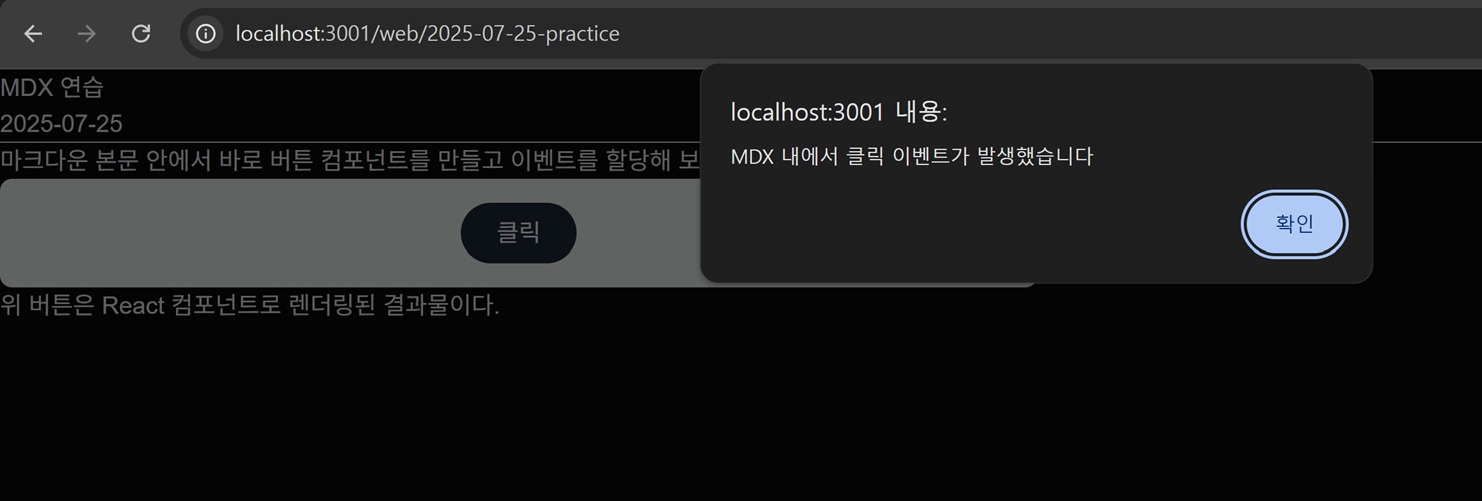 Figure 1. Button component and click event working correctly within the Markdown body
Conclusion#
In fact, I don't plan on writing every general blog post in .mdx.
However, I can look forward to its usefulness when creating a single page that includes special features.
As an aside, I am currently using VSCode for blog development,
and writing React components inside .mdx files is extremely inconvenient.
I should check if there are extensions for auto-completion or highlighting and apply them.
📌 And sure enough, an extension called
MDXexists. Let's use it.