

Next.js Blog CI/CD: GitHub Actions
Contents
Notice
This text was originally translated using AI tools.
Introduction#
I had been ignoring it since I don't update my blog or write posts very often, but during the process of deploying a Git Blog, the task of pushing to the repository and the actual deployment were completely separate. Constantly having to manage both parts became too cumbersome.
I have known for a long time that GitHub has CI/CD features and that this was entirely possible, but I kept putting it off until now. For reference, this blog uses the Next.js static export method.
Manual Deployment#
Previously, separate from uploading to the Git repository, I had to proceed with the following configuration and deployment process:
package.jsonSettings
"scripts": {
    "dev": "next dev --turbopack",
    "build": "next build",
    "start": "next start",
    "lint": "next lint",
    "preview": "serve -s out",
    "deploy": "touch out/.nojekyll && gh-pages -d out -b gh-pages --dotfiles"
}- Deployment Process
pnpm run build      # Build the project
pnpm run deploy     # Deploy build files
In other words, manual work was always required between pushing code to the repository and the actual deployment.
Automated Deployment#
What I want is for the process from build to deployment to proceed automatically
through a series of steps whenever I push the project to the main branch.
To achieve this, I configured GitHub Actions CI/CD, and the preparations are as follows.
Let's look at them one by one.
- Writing the Workflow yml script
- GitHub Pages settings
Writing the Workflow yml script
First, you must write a Workflow yml script like the one below and place it inside the project at .github/workflows/deploy.yml.
# Workflow name (Displayed in the GitHub Actions tab)
name: Deploy Git Blog

# Conditions for the Workflow to run
# Automatically runs when a push occurs on the main branch
on:
  push:
    branches:
      - main

# Grant write permission to repository contents for GitHub Pages deployment
permissions:
  contents: write

jobs:
  deploy:
    # Execution environment (Latest Ubuntu version provided by GitHub)
    runs-on: ubuntu-latest

    steps:
      # Checkout the current repository code
      - name: Checkout
        uses: actions/checkout@v4

      # Install pnpm
      # Fix only the major version to minimize the risk of lockfile changes
      - name: Setup pnpm
        uses: pnpm/action-setup@v3
        with:
          version: 10

      # Node.js environment setup
      # Fix the major version for stability and maintenance
      # Use pnpm cache to improve dependency installation speed
      - name: Setup Node
        uses: actions/setup-node@v4
        with:
          node-version: 22
          cache: pnpm

      # Install dependencies
      - name: Install dependencies
        run: pnpm install

      # Build project
      # Next.js static export output is created in the 'out' directory
      - name: Build & Export
        run: pnpm run build

      # Disable Jekyll processing on GitHub Pages
      # (Prevents files starting with '_' like '_next' from being removed)
      - name: Disable Jekyll
        run: touch out/.nojekyll

      # Deploy built output to the gh-pages branch
      - name: Deploy to GitHub Pages
        uses: peaceiris/actions-gh-pages@v4
        with:
          # Token automatically provided by GitHub
          github_token: ${{ secrets.GITHUB_TOKEN }}
          # Directory to deploy
          publish_dir: ./out
GitHub Pages Settings
If you are already running a Git Blog, it should be applied well, but double-check that the settings are correct once more.
- Settings → Pages
- Source:
- Branch:
gh-pages - Folder:
/
- Branch:
Once these two settings are ready, every time code is pushed to the main branch,
GitHub Actions will automatically run to build the project and deploy the results to the gh-pages branch.
Now, you won't need to run a separate deployment command in your local environment;
pushing to the repository will trigger the deployment automatically.
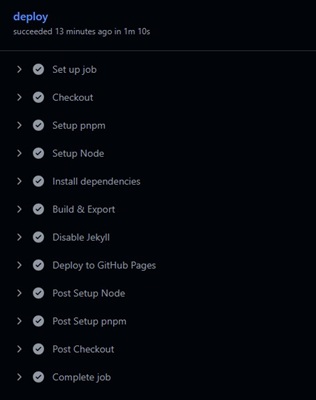 Figure 1. CI/CD workflow successfully completed
Conclusion#
Operations have become much easier overall as the management points have been reduced to one.
I thought that with this method, I could even create and manage a branch specifically for managing Markdown files separately..
However, since the project itself is likely to continue being modified and expanded,
it seems more appropriate to maintain the current structure for now.